TrendForge Compare Guide: How to Evaluate the Right Tool

TrendForge Compare is best used as a decision-making page for weighing features, fit, and workflow needs. The smartest comparison focuses on content speed, consistency, and how well the tool supports your actual day-to-day publishing process.
TrendForge Compare helps you make a practical choice: pick the content tool that saves time, fits your workflow, and actually gets used. If you’re a network marketer, LegalShield or IDShield associate, entrepreneur, or small-business owner, the real question isn’t which platform has the longest feature list. It’s which one helps you create better social content faster, with less friction, and more consistency.
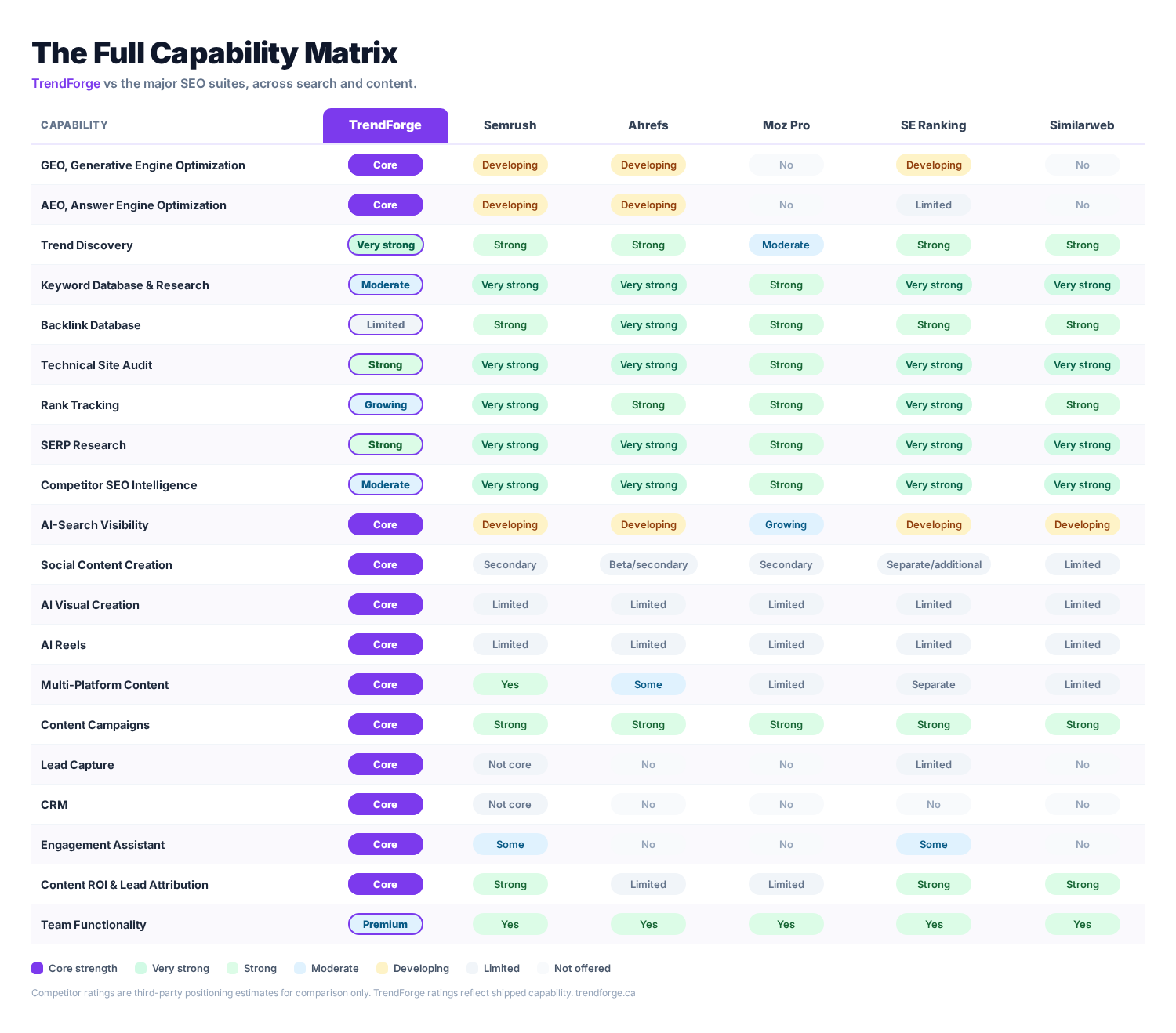
That’s the lens I use when comparing tools. Features matter, but workflow wins. A tool that looks impressive on paper can still fail if it slows you down on a Monday morning when you need to post, follow up, and move on.
What Is TrendForge Compare?
TrendForge Compare is a decision page designed to help you evaluate TrendForge against your current content process or other tools you may be considering. It’s built for people who need a clearer buying decision, not more marketing noise.
In plain terms, it helps you answer three questions:
- Can this tool help me create content faster?
- Will it match how I already work?
- Does it solve a real problem I have every week?
Why Compare Social Content Tools at All?
Because bad tool choices waste time. I’ve seen teams and solo operators buy software for one shiny feature, then ignore it because the setup was clunky or the output didn’t fit their brand.
A good comparison keeps you focused on outcomes. You want more consistent posting, better message alignment, and less blank-page stress. That’s the real job.
What Should You Compare First?
Start with the parts that affect daily use. Don’t begin with pricing alone. Start with fit.
- Content speed: How quickly can you go from idea to post?
- Brand consistency: Does the output sound like you?
- Ease of use: Can you use it without a steep learning curve?
- Workflow fit: Does it support how you plan, write, and publish?
- Reuse potential: Can one idea become multiple posts, captions, or variations?
How Does TrendForge Fit into a Real Workflow?
TrendForge is designed for people who need repeatable social content, not one-off creative experiments. That matters. Most small business owners don’t need a fancy content lab. They need something reliable they can use between sales calls, appointments, and follow-ups.
Here’s where a platform like TrendForge can fit well:
- Planning weekly content themes
- Turning rough ideas into usable post drafts
- Keeping messaging consistent across platforms
- Reducing the time spent staring at a blank screen
If your content process breaks because you have to think too hard every time, the problem isn’t motivation. It’s workflow design.
What Features Matter Most in a Comparison?
The best comparison isn’t about who has the most buttons. It’s about which features help you publish with less resistance.
| Comparison Area | What To Look For | Why It Matters |
|---|---|---|
| Ease Of Use | Simple interface, low setup time | Helps you start using it quickly |
| Content Output | Clear, usable drafts | Reduces editing time |
| Brand Alignment | Messaging that feels natural | Keeps your voice consistent |
| Workflow Support | Templates or repeatable steps | Makes posting more sustainable |
| Time Savings | Faster idea generation | Frees up time for outreach and sales |
How Do You Compare TrendForge to Other Options?
Compare TrendForge against the tools you already use in the real world. That might be a blank notes app, a generic AI writer, or a content calendar that never gets filled.
A useful comparison asks, “What does this tool help me do better?” Not “How many features does it have?”
A Simple Step-By-Step Comparison Process
- List your current content pain points.
- Choose three tasks you do every week.
- Test whether the tool reduces time on those tasks.
- Check whether the output needs heavy rewriting.
- Decide based on workflow fit, not hype.
If a tool saves ten minutes but creates extra editing later, that’s not a win. It’s hidden work.
Who Is TrendForge Best For?
TrendForge is a strong fit for people who need practical social content support, especially if they publish often and want to stay consistent without hiring a full-time copywriter.
- Network Marketers who need steady, brand-safe posts
- LegalShield Independent Associates who want professional content
- Entrepreneurs building authority on social platforms
- Small Business Owners who need efficient content creation
If your content has to support conversations, trust, and follow-up, that’s where a focused tool matters most.
What Should You Ask Before You Choose?
Ask the questions that reveal whether a platform will actually get used.
- Will this save me time every week?
- Will it help me post more consistently?
- Will I need to rewrite everything it generates?
- Does it fit my current process, or force me into a new one?
- Will my team actually adopt it?
The best content tool is the one you’ll still be using three months from now.
How Should You Use the Comparison Page?
Use TrendForge Compare as a filter, not a sales pitch. Read it with your own workflow in mind. If you already know your bottleneck is consistency, then compare based on repeatability. If your bottleneck is speed, compare based on how fast you can go from prompt to post.
That mindset keeps you from buying software for a feature you’ll never touch.
What Is the Bottom Line?
TrendForge Compare is most valuable when you use it to judge real-world fit. The right content platform should make posting easier, reduce decision fatigue, and support your daily business rhythm.
If a tool helps you publish faster and stay consistent without adding complexity, that’s a strong sign it belongs in your stack.
For more context on choosing content tools wisely, you can also compare how different workflows affect consistency, editing time, and message clarity. The best choice is usually the simplest one that your team will actually keep using.
For broader guidance on evaluating software and digital tools, see Nielsen Norman Group’s guidance on how people read online. It’s a useful reminder that clarity beats clutter every time.
Short version: compare TrendForge by looking at fit, speed, and consistency. Those three factors tell you more than any flashy feature list ever will.
Frequently Asked Questions
What Is TrendForge Compare?
TrendForge Compare is a page or process for evaluating TrendForge against other content options. It helps you decide whether the platform fits your workflow and content goals.
What Should I Compare First?
Start with speed, ease of use, and brand fit. Those are the factors that affect whether the tool becomes part of your routine.
Is TrendForge Good for Small Businesses?
Yes. TrendForge is a practical fit for small businesses that need consistent social content without spending hours writing from scratch.
How Do I Know if a Content Tool Is Worth It?
A content tool is worth it if it saves time, reduces rewriting, and helps you post more consistently. If it adds complexity, it’s probably not worth the switch.
Should I Compare Features or Workflow First?
Workflow first, features second. A tool can have great features and still be a bad fit if it doesn’t match how you work.
Written By
The TrendForge Team
The TrendForge editorial team covers social media marketing, content strategy, and AI-assisted content creation, drawing on the same trend-discovery and generation engine that powers the TrendForge platform.